![Group 2136 (1).png]](https://support.reloadly.com/hs-fs/hubfs/Group%202136%20(1).png?height=27&name=Group%202136%20(1).png)
Airtime Transactions Report
Understand every field and column in your Airtime Transactions Report Sophia Rascon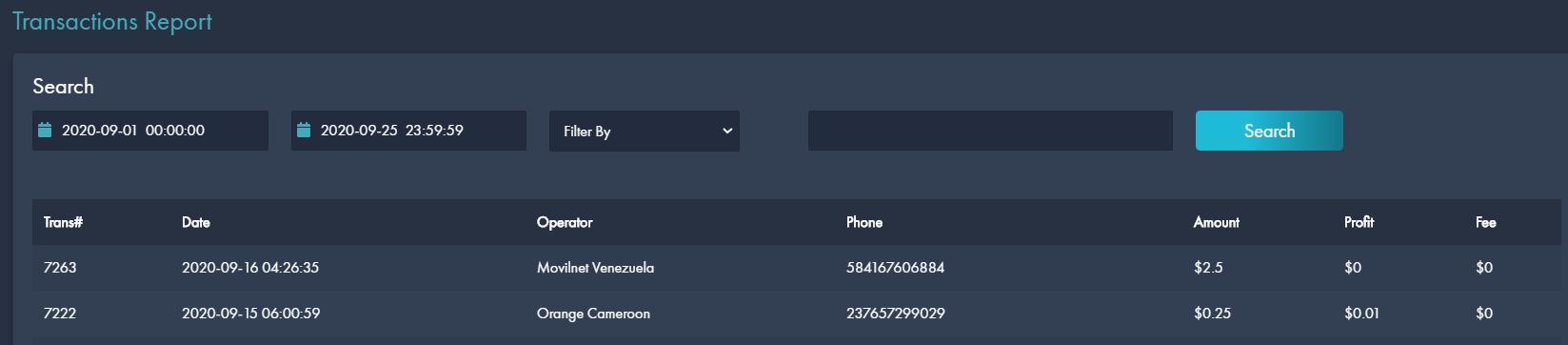
When you click on "My Reports" and "Airtime Transactions" you will see the following table:
You will see the following details:
Transaction ID: we will need this field whenever you report an issue with a topup
Date: the transaction date
Operator: This is the operator's name
Phone: the recipient's phone
Amount: the amount sent in your account's currency
Profit: this is the commission you get for this transaction (it remains in your wallet)
Fee: any fees that apply
You may search by Date and filter by Amount, Operator Name or Phone.
If you have any issues regarding a transaction please contact our Customer Success team. We will be more than glad to help!
Did this answer your question?